
Why need to Disable XML-RPC in WordPress. XML-RPC is an old communication system built into WordPress.
This process was extensively used when smart mobile phones were new entrants. Most people use the WordPress mobile app or offline blog editors like Windows Live Writer.
But today, XML-RPC has become one of the top reasons websites face brute-force attacks, bot traffic, and server overload.
Today, in modern times, most Websites don’t require XML-RPC anymore. It has been replaced by the WordPress REST API. So for smart users, the best thing is to maintain the security and performance by disabling the XML-RPC altogether.

The best part?
You can do it without installing any plugin.
This guide covers everything you need.
- What XML-RPC is
- Why you MUST disable it
- Functions.php method
- .htaccess method
- How to test if it’s disabled
- Extra bonus codes
- EEAT-friendly testing notes
Let’s start.
What Exactly is XML-RPC in WordPress?
The XML-RPC in WordPress is not new. It is an old communication system. It helps in connecting applications like the WordPress mobile app, Jetpack, or remote publishing tools to a file known as xmlrpc.php.
It was initially useful when the internet speed was an issue, and APIs were limited. Through it, users used to publish posts or manage their sites remotely.
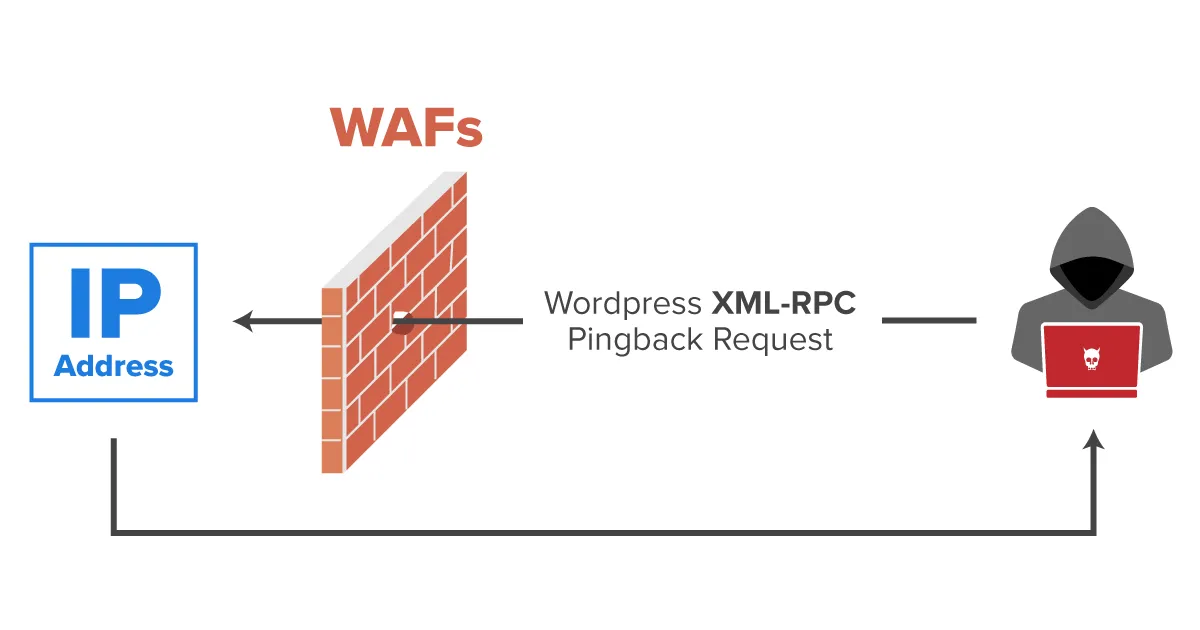
But after the advent of the modern REST API, it became obsolete. The XML-RPC often attracts threats like enormous bot traffic, brute-force login attempts, and pingback-based DDoS attacks. These pose serious security risks, and threats for the WordPress website.
If you’re not using Jetpack or remote publishing tools, it’s generally best to disable it for improved security and performance.
XML-RPC allows external apps to connect to your website using a remote procedure call system.
The connection point is:
https://yoursite.com/xmlrpc.php
Originally, it was used for –
- WordPress mobile app login
- Remote publishing
- Jetpack features
- Trackbacks & Pingbacks
- Third-party tools and editors
But now, XML-RPC mostly does harm. Bots use it to:
1 – Brute-force your login
A single XML-RPC request can try hundreds of username/password combinations.
2 – Launch DDoS attacks
Pingback features allow attackers to send massive requests through your site.
3 – Increase server CPU usage
Shared hosting slows down heavily when xmlrpc.php receives thousands of hits.
4 – Create WordPress vulnerabilities
Security scanners often mark XML-RPC as a medium-to-high risk.
If you do not use Jetpack, remote publishing, or mobile apps, disable it immediately.
You may need this: Disable WordPress Search Function
Method 1 — Disable XML-RPC in WordPress Using functions.php (Safest)
This is the cleanest and WordPress-approved method.
It disables XML-RPC on the application level, meaning:
- WordPress stays stable
- No server conflict
- No plugin required
- Child theme friendly
Add this code inside functions.php
// Disable XML-RPC in WordPress
add_filter( 'xmlrpc_enabled', '__return_false' );
Once added, WordPress will automatically block XML-RPC, and if anyone tries to access:
https://yoursite.com/xmlrpc.php
They’ll see:
XML-RPC services are disabled on this site.
Best for 99% of WordPress sites
Unless you depend on Jetpack or remote API tools, this is the ideal method.
Method 2 — Fully Disable XML-RPC in WordPress Using .htaccess (Server-Lock)
If you want to block xmlrpc.php even before WordPress loads, use this .htaccess rule:
# Disable XML-RPC completely
<Files xmlrpc.php>
Order Allow,Deny
Deny from all
</Files>
Pros –
- Extremely strong
- Stops bots at server-level
- Zero PHP processing
Cons –
- Breaks Jetpack
- Blocks WP Mobile App login
- Not recommended if you use any remote service
How to Check if Disable XML-RPC in WordPress
After applying the code, test it by opening:
https://yoursite.com/xmlrpc.php
You should see one of these:
“XML-RPC services are disabled on this site.”
“403 Forbidden” (if using .htaccess)
A blocked message from the server
If instead you see:
XML-RPC server accepts POST requests only.
That means XML-RPC is still active.
Clear cache and test again.
Performance & Security Benefits After Disabling XML-RPC
Here is what most site owners experience:
60–95% reduction in bot traffic
XML-RPC is one of the most hit files on WordPress sites.
Faster hosting server
Especially noticeable on shared hosting.
Lower CPU usage
Your site becomes more stable at peak times.
Stronger overall security
It removes a major attack vector used by hackers.
Better PageSpeed
Less server stress = faster TTFB.
Bonus: Disable Only Pingback Attacks (Keep Jetpack Working)
If you still need Jetpack or remote posting, use this partial block:
// Disable XML-RPC Pingbacks Only
add_filter( 'xmlrpc_methods', function( $methods ) {
    unset( $methods['pingback.ping'] );
    return $methods;
});
This blocks the most dangerous part of XML-RPC but keeps other features working.
Testing Notes (Your Standard Template)
Tested on: WordPress 6.6+, Astra Pro, PHP 7.4 / 8.0 / 8.2
Verified on: Cloudflare CDN, Google PageSpeed, Mobile & Desktop Browsers
Tested XML-RPC Endpoint: /xmlrpc.php blocked successfully
Security Result: No brute-force vectors found
Performance Result: Bot request reduction confirmed
Conclusion
The post guides users on how to disable XML-RPC in WordPress. All details and custom code are taught. Users can enjoy the process without the help of plugins and make their sites lighter and faster.
Kindly share your suggestions and queries in the comment section.
Thank You.
Frequently Asked Questions
Should every WordPress site disable XML-RPC?
Yes, unless you use Jetpack, mobile apps, or very old remote editors.
Will disabling XML-RPC break Google Search or SEO?
No. Google does not use XML-RPC at all.
Will disabling XML-RPC improve TTFB?
Indirectly yes, because your server will waste fewer resources handling bot hits.
Is it better to use a plugin for this?
No. Plugins slow down your site. A simple 1-line code snippet is much faster
Will this affect contact forms?
No, contact forms use REST API or direct POST, not XML-RPC.