
The post guides readers and users on how to block AI Bots in WordPress Without Plugin?The solution and answer to this question are illustrated here. You can easily block AI bots without using plungin.
AI bots like GPT bots and CC bots and regularly crawling your website and gathering data from your website to train their AI. Learn here to block AI bots in WordPress without a plugin. So that they don’t use your content. It is possible without using a plugin.
Table of Contents
Get the procedure here to block AI crawlers using robots.txt or code. It’s clean, fast, and keeps you in control.
Why Block AI Bots in WordPress Without Plugin?
Let’s break it down in simple terms: your content is valuable.
It often happens, AI companies use bots to gather huge amounts of text and data from the internet.
It includes tutorials, posts, product descriptions, and other written content.
AI companies use bots to collect huge amounts of text and data from the internet. That includes your blog posts, tutorials, product descriptions, and other written content.
These bots are well-trained and compensate you without linking back.
There are a few reasons to block AI bots in WordPress:
- Protect your original content from being reused by AI systems.
- Prevent traffic loss if searchers get AI-generated answers instead of visiting your site.
- Keep private or niche content off AI datasets.
- Take back control of what crawlers access on your site.
If you’ve invested time and effort into your site, you deserve to decide how it’s used.
How to Block AI Bots in WordPress Without Plugin Using Robots.txt
The solution to block AI Bots in WordPress without a Plugin is easy. You have to change in robot.txt file or, optionally, change in function.php file.
The easiest way to block AI bots is by editing your WordPress site’s robots.txt file. This file tells bots what they’re allowed (and not allowed) to crawl.
Block GPTBot and CCBot
Add the following lines to your robots.txt file:
User-agent: GPTBot
Disallow: /

User-agent: CCBot
Disallow: /
⚠️❌Warnings: When Editing Robots.txt in WordPress don’t block the search engine like:
User-agent: *
Disallow: /
Optional: Block More AI Bots
You can also block other known AI crawlers like this:
User-agent: ClaudeBot
Disallow: /

User-agent: anthropic-ai
Disallow: /

User-agent: Google-Extended
Disallow: /

User-agent: ia_archiver
Disallow: /
Note: Most reputable AI companies follow the
robots.txtrules, but not all bots do. This won’t stop rogue crawlers, but it helps with the major ones.
How to Edit Robots.txt in WordPress (Without Plugins)
Option 1: Using File Manager or FTP
- Go to your hosting panel (like cPanel).
- Navigate to the root folder of your WordPress site.
- Find or create a
robots.txtfile. - Paste in the AI bot rules above and save.
Option 2: Use WordPress Code (No FTP Needed)
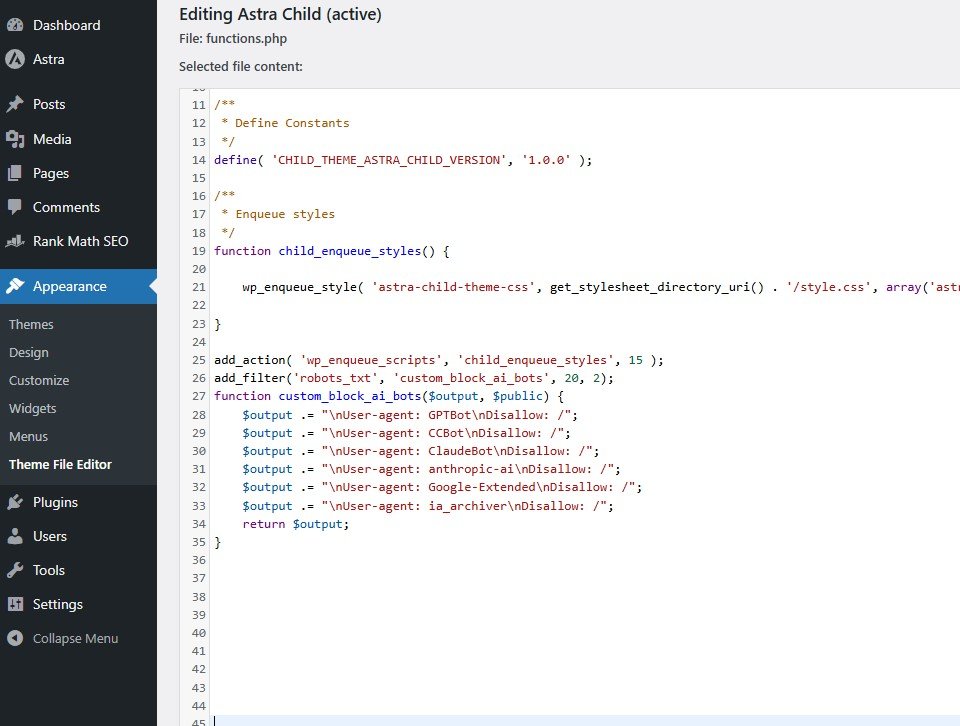
If you don’t want to use or FTP not accessible then use this code snippet:
Go To
Appearance → Theme File Editor→ Function.php
add_filter('robots_txt', 'custom_block_ai_bots', 20, 2);
function custom_block_ai_bots($output, $public) {
    $output .= "\nUser-agent: GPTBot\nDisallow: /";
    $output .= "\nUser-agent: CCBot\nDisallow: /";
    $output .= "\nUser-agent: ClaudeBot\nDisallow: /";
    $output .= "\nUser-agent: anthropic-ai\nDisallow: /";
    $output .= "\nUser-agent: Google-Extended\nDisallow: /";
    $output .= "\nUser-agent: ia_archiver\nDisallow: /";
    return $output;
}
This approach uses WordPress’s built-in robots_txt filter. It works even if you don’t have a physical robots.txt file.
How to Check If It’s Working
Visit this URL on your site:https://yourdomain.com/robots.txt
You should see all the AI bots listed and blocked. If not, clear your site cache and refresh.
You can also test your file at: robotstxt.org validator
Summary – Block AI Bots in WordPress Without Plugin
- Primary method:
robots.txt - No extra plugins required
- Works with major AI bots like GPTBot, CCBot, ClaudeBot
- Helps protect your content and your traffic
Conclusion
If you want to block AI bots in WordPress, you don’t need another plugin cluttering your site. A few simple lines in robots.txt — or a quick code snippet, is all it takes.
This way, without the Plugin and with the use of code snippets, we block bots. The website will become faster and lighter.
Kindly share us your comments and queries. You are valuable to us.
Thank You.
Want more plugin-free WordPress hacks?
Explore all our No Plugin Guides »