
Every WordPress website owner wants to improve the site’s SEO, accessibility, and image search visibility. For it, you have to learn a potent but simple process to Auto Add Alt Text to Images in WordPress Without Plugin.
The problem arises when we have to do it manually for thousands of files in the Media Library. Filling Alt Text to every image is laborious and time consuming.
Table of Contents
We will guide you here how to automatically generate alt text for images in WordPress without using any plugin.
We will cover here –
- Set the auto process for Alt Text while image uploading.
- How to bulk-fill all the missing alt text images.
- Clean and SEO-friendly alt text formatting
- Safe, non-destructive code that never overwrites manual alt text
- Testing & validation steps
- You can also lazy load images
Why Auto Add Alt Text to Images in WordPress Without Plugin?
Search engines rely on alt attributes to understand images. When the Alt text is missing, the search engine fails to understand the usability and attributes of images to give them a proper platform for exact users.
When the Alt Text column is properly filled, you get the proper context for product images, blog thumbnails, and in-content visuals.
This method helps by:
- Improving SEO rankings
- Boosting Google Image Search visibility
- Enhancing accessibility for screen readers
- Saving hours of manual work
Method 1 – Auto-Set Alt Text on Image Upload (functions.php)
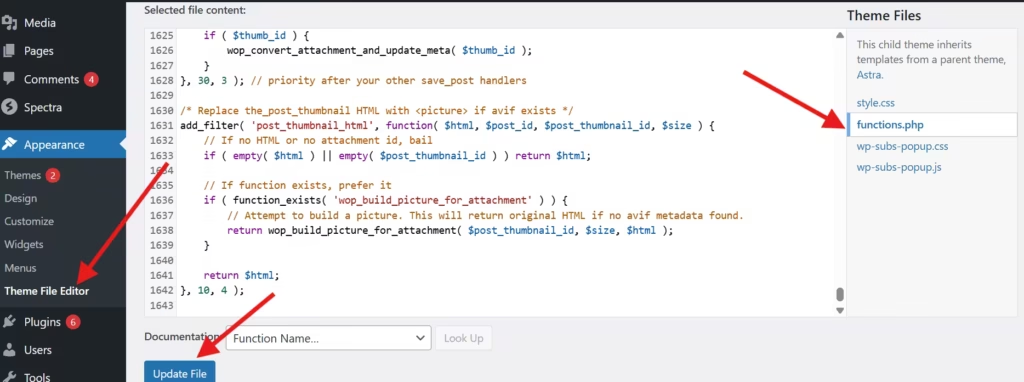
Add this code to your theme’s functions.php file (or a site-specific plugin):
// Auto-set alt text on upload if empty — put in functions.php
add_action( 'add_attachment', 'wpso_autoset_attachment_alt' );
function wpso_autoset_attachment_alt( $attachment_id ) {
    // Only run for images
    $mime = get_post_mime_type( $attachment_id );
    if ( strpos( $mime, 'image/' ) !== 0 ) {
        return;
    }

    // Check existing alt
    $alt = get_post_meta( $attachment_id, '_wp_attachment_image_alt', true );
    if ( ! empty( $alt ) ) {
        return; // already has alt
    }

    // Use the image title if available, else filename
    $title = get_the_title( $attachment_id );
    if ( empty( $title ) ) {
        $file = get_attached_file( $attachment_id );
        $title = pathinfo( $file, PATHINFO_FILENAME );
    }

    // Clean up title to be nice alt text
    $alt_text = wp_strip_all_tags( $title );
    $alt_text = trim( preg_replace( '/[-_]+/', ' ', $alt_text ) );

    if ( ! empty( $alt_text ) ) {
        update_post_meta( $attachment_id, '_wp_attachment_image_alt', wp_slash( $alt_text ) );
    }
}
What this does for your website
- Runs whenever an image is uploaded
- If alt text is empty, it uses the image title
- If title is empty, it extracts a clean alt text from the filename
- It never overwrites existing alt text
Method 2 – Bulk-Fill Auto Add Alt Text to Images in WordPress
If you have so many uploaded images on your WordPress website, use this method. It is for bulk update.
Add this temporary code to functions.php:
// Bulk update missing alt texts — add to functions.php temporarily
add_action( 'admin_init', 'wpso_bulk_fill_missing_alts' );
function wpso_bulk_fill_missing_alts() {
    // Only allow admins and only run when ?run_autofill=1 is in URL
    if ( ! current_user_can( 'manage_options' ) || ! isset( $_GET['run_autofill'] ) || $_GET['run_autofill'] != '1' ) {
        return;
    }

    $args = array(
        'post_type'      => 'attachment',
        'post_mime_type' => 'image',
        'posts_per_page' => 200,
        'post_status'    => 'inherit',
        'fields'         => 'ids',
    );

    $query = new WP_Query( $args );
    $count = 0;
    foreach ( $query->posts as $att_id ) {
        $alt = get_post_meta( $att_id, '_wp_attachment_image_alt', true );
        if ( ! empty( $alt ) ) {
            continue;
        }

        $title = get_the_title( $att_id );
        if ( empty( $title ) ) {
            $file = get_attached_file( $att_id );
            $title = pathinfo( $file, PATHINFO_FILENAME );
        }

        $alt_text = wp_strip_all_tags( $title );
        $alt_text = trim( preg_replace( '/[-_]+/', ' ', $alt_text ) );

        if ( ! empty( $alt_text ) ) {
            update_post_meta( $att_id, '_wp_attachment_image_alt', wp_slash( $alt_text ) );
            $count++;
        }
    }

    // Show admin notice with result
    add_action( 'admin_notices', function() use ( $count ) {
        printf( '<div class="notice notice-success"><p>Auto alt fill done — %d images updated.</p></div>', esc_html( $count ) );
    } );

    // Redirect after run
    if ( isset( $_GET['run_autofill'] ) ) {
        $url = remove_query_arg( 'run_autofill' );
        wp_safe_redirect( $url );
        exit;
    }
}
How to run it –
Visit any admin page with this URL:
https://yourwebsite.com/wp-admin/?run_autofill=1
You’ll see a success message:
After success, remove the bulk updater code from functions.php.
Method 3 – Bulk-Update Via WP-CLI (Best for Large Sites)
Create a file like autofill-alts.php:
<?php
require_once( 'wp-load.php' );
$args = array(
    'post_type' => 'attachment',
    'post_mime_type' => 'image',
    'posts_per_page' => -1,
    'post_status' => 'inherit',
    'fields' => 'ids',
);
$ids = get_posts( $args );
$count = 0;
foreach ( $ids as $id ) {
    $alt = get_post_meta( $id, '_wp_attachment_image_alt', true );
    if ( ! empty( $alt ) ) continue;
    $title = get_the_title( $id );
    if ( empty( $title ) ) {
        $file = get_attached_file( $id );
        $title = pathinfo( $file, PATHINFO_FILENAME );
    }
    $alt_text = wp_strip_all_tags( $title );
    $alt_text = trim( preg_replace( '/[-_]+/', ' ', $alt_text ) );
    if ( ! empty( $alt_text ) ) {
        update_post_meta( $id, '_wp_attachment_image_alt', $alt_text );
        $count++;
    }
}
echo "Updated $count images\n";
Run it:
wp eval-file autofill-alts.php
Method 4 – Customization Ideas
You can modify alt text patterns:
Use Product-Friendly Format
"Product photo: {image-title}"
Use Parent Post Title
Use when an image is attached to a post:
{post-title} – product image
Testing Notes of Auto Add Alt Text to Images in WordPress
Tested on: WordPress 6.6+, Astra Pro, PHP 7.4/8.0/8.2
Verified on: Google PageSpeed, Cloudflare CDN, Mobile & desktop browsers
Test Checklist
- When you go for a new upload, the alt text will be created automatically.
- Upload an image with manual alt. It must NOT be overwritten.
- Run the bulk script on staging first.
- Check Lighthouse accessibility score. (It should improve)
Conclusion
This way, the post guides its users regarding the procedure to upload alt text in images without plugins. We have also mentioned the bulk alt text upload process.
It will not only improve the SEO for your WordPress website but also make it faster, lighter, and user-friendly.
Kindly share your comments and suggestions in the comment section.
Thank You.
FAQs
Does this overwrite my manual alt text?
No, it only fills alt fields that are empty.
Is this safe for SEO?
Yes. Clean alt text helps search engines understand your images.
Can I use this in a child theme?
Yes, recommended. But You can also use in your main theme.