
Sometimes we need to disable WordPress search function. If you have a WordPress website and you don’t want any search feature on it, like a portfolio, a landing page, or a simple business website, you don’t require. It is possible to remove the built-in search bar in WordPress.
This action helps in streamlining your website to improve its security & protection, and minimises the unnecessary website load.
Table of Contents
Here is some good news for you. You can easily disable the search functionality without plugin. All it takes is a small change to your functions.php file. Let’s walk through the process.
Why Disable WordPress Search Function?
Search function is not for every website. For example:
- A one-page website with no blog
- A digital CV or portfolio
- A business site with limited static pages
If these are the cases, you don’t require a search box. It is of no use to you. It can confuse our website visitors.
Disabling it removes clutter and gives you more control over your user experience.
How to Disable WordPress Search function via functions.php
You don’t need to add another plugin for your site.
Instead, you can paste the following code into your theme’s functions.php file:
Go to your function.php file placed in Appearance → Theme File Editor→ Function.php
function disable_wp_search( $query, $error = true ) {
    if ( is_search() ) {
        $query->is_search = false;
        $query->query_vars['s'] = false;
        $query->query['s'] = false;
        if ( $error ) {
            $query->is_404 = true;
        }
    }
}
add_action( 'parse_query', 'disable_wp_search' );

function remove_search_form( $form ) {
    return '';
}
add_filter( 'get_search_form', 'remove_search_form' );
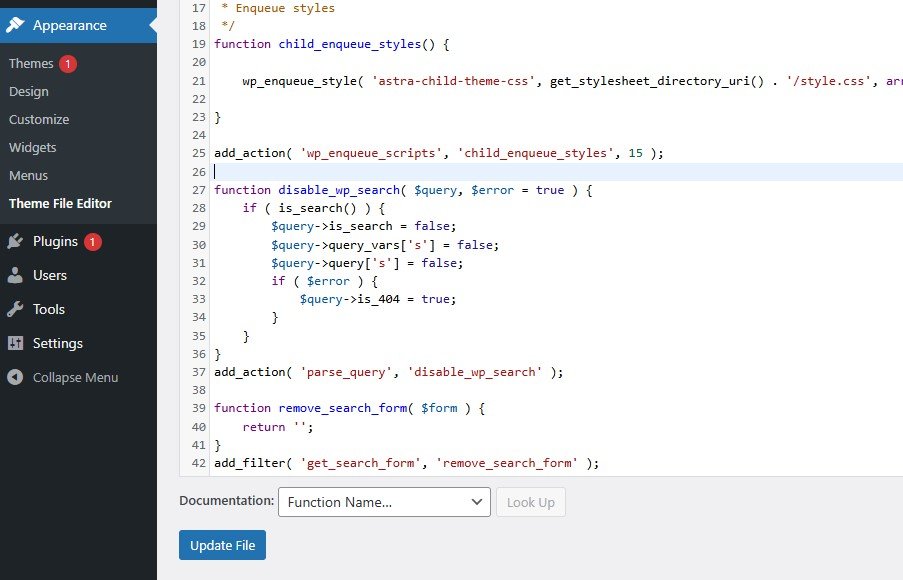
What Does This Code Do?
- Blocks search queries: If someone tries to search anything, they’ll be redirected to a 404 page.
- Removes the search form: If your theme displays a search form, this will return an empty form instead, making it invisible to users.
Where to Add This Code
- Go to your WordPress dashboard
- Navigate to Appearance → Theme File Editor
- Open your active theme’s functions.php file
- Paste the code at the bottom of the file
- Click Update File
Important: Always back up your site or use a child theme before editing theme files!
How to Test It
After adding the code:
- Try visiting
yourdomain.com/?s=test– it should take you to a 404 page. - Check your theme’s layout – the search bar should be gone (or no longer functional).
How to Undo It Later
Changed your mind? Simply remove or comment out the code from your functions.php file. The default WordPress search functionality will be restored immediately.
Conclusion
How to disable the search feature in a WordPress website is illustrated here. The process is defined by using code and going without a plugin. How to use the code is also demonstrated.
The benefits of removing the search box is highlighted.
By editing the functions.php file, you avoid unnecessary plugins and keep your site lean and fast.
If you’re into optimising WordPress without plugins, this is a great trick to keep in your toolkit.
Kindly share your suggestions and queries in the comment section. We appreciate your suggestions and respond tp your queries.
Thank You.
Did this guide help?
Check out more plugin-free WordPress hacks right here on WithoutPlugin.com!